Part 3: Embed Your Agent into Business Processes
In Parts 1 and 2, you built and configured a Customer Support Agent that can reason, research, and respond to customer inquiries. But a deployed agent sitting idle isn't providing business value. The real transformation happens when you embed that agent into your business processes—creating autonomous, event-driven workflows that operate continuously.
This is where the Integration Mindset and the Agentic Mindset come together beautifully.
Architectural Layers Working Together
In Role-based Agentic Architecture, the Integration Mindset and Agentic Mindset are complementary, not conflicting:
The Integration Layer (The "Assembly Line"):
- Reliable, predictable, structured data flow
- Optimized for low latency and high throughput
- Handles real-time data streaming and transactions
- The Task: Execute high-speed data transformation and movement
The Reasoning Layer (The "Digital Colleague"):
- Flexible, goal-oriented autonomy
- Operates on the data flow, not in it
- The Role: Design, observe, and manage the data flow as an architect, monitor, or governor
Your Customer Support Agent operates in the Reasoning Layer—it thinks, plans, and decides what to do. But it doesn't sit in the critical path of high-speed data flows. Instead, it's activated by events from the Integration Layer when its expertise is needed.
Configure Agent Control Tower
Before you can invoke your agent from an integration process, you need to add your Boomi account as an Agent Provider in Agent Control Tower.
If you're participating in an instructor-led workshop using a shared environment, this section may already be configured for you. Check with your instructor before proceeding. You can skip to Build the Integration Process if this is already set up.
-
Navigate to Agentstudio (if not already there).
-
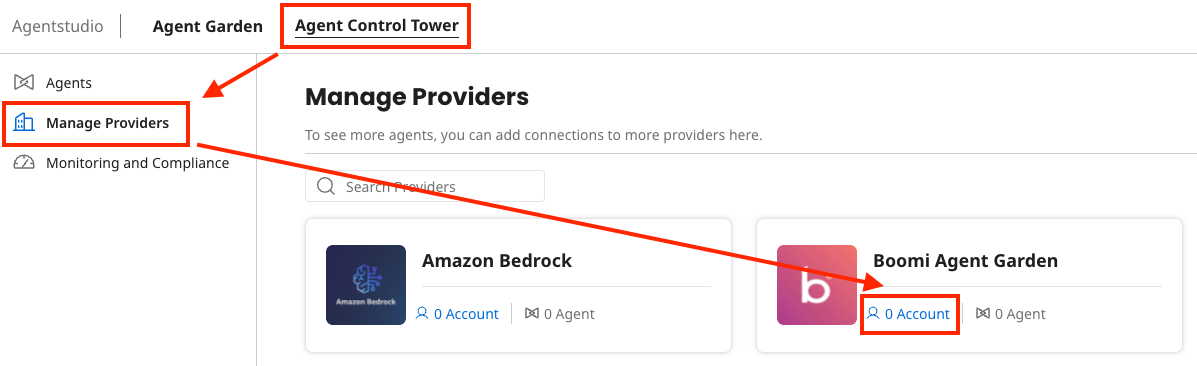
Select Agent Control Tower from the left navigation menu.
-
Select Manage Providers on the left.
-
Select the Account link under Boomi Agent Garden.
-
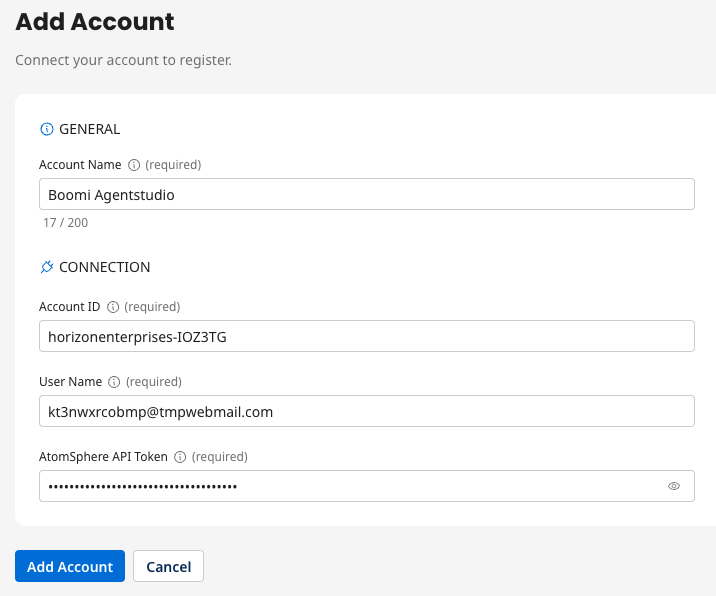
Select Add Account and populate the fields with the values you saved in the Prerequisites section:
- Account Name:
Boomi Agentstudio - Account ID: Enter Account ID from prerequisites
- User name: Enter your platform email address
- AtomSphere API Token: Enter Platform API Token from prerequisites
 Account Synchronization
After adding your account it will synchronize momentarily. Your agents will display after the sync completes. You can continue with the next steps while the sync is in progress.
- Account Name:
Build the Integration Process
Now you'll build an integration process that activates your Customer Support Agent when a new support case arrives.
-
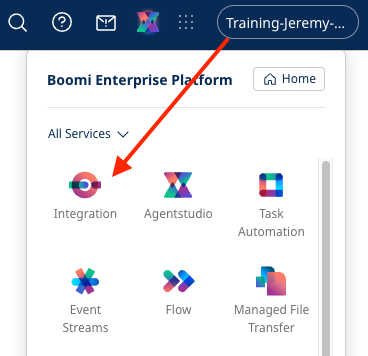
Click on the waffle menu (9 dots) at the top right of the screen.
-
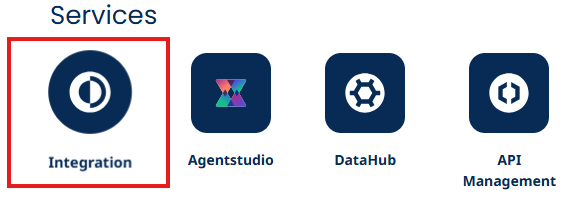
Click Integration.
-
Once in Integration, navigate to Build > Components.
-
Navigate to the Participants > YOUR WORKSHOP > your email prefix directory.
Finding Your DirectoryYour workshop directory structure may vary. Look for a folder with your email prefix or initials where you've been saving your work.
-
Click on the three dots next to your folder name.
-
Click New Component.

-
Select Process in the modal dropdown.
-
Click Create.
-
Choose No Data in the right hand pane.
-
Click OK.
-
Click on New Process in the bar above the canvas.
-
Rename your process to:
[builderInitials] Customer Support Automation
Add the Message Step
-
Click the + button on the canvas.
-
Search for and select a Message component.
-
Click on the newly created Message component to configure it.
-
In the Body field, paste the test message from Part 2:
Hey, my order #12345 hasn't arrived. The tracking link says 'pending' but it's been a week. Can you help? Also can you give me compatibility information about the products in my order? I want to make sure they're going to be compatible.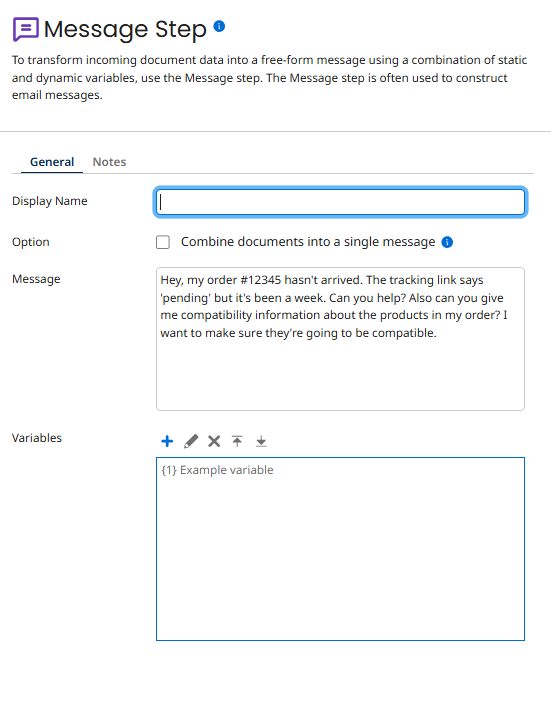
-
Click OK.
Add the Agent Step
-
Click the + button on the canvas.
-
Search for and select Agent.
-
Click on the Agent component to configure it.
-
Click Generate Configuration.
-
Select your Customer Support Agent [builderInitials] agent from the dropdown.
Agent Not Listed?If you don't see your agent listed, navigate to Agent Control Tower > Manage Providers. Find the Boomi account and click Sync Now to refresh the agent list.
-
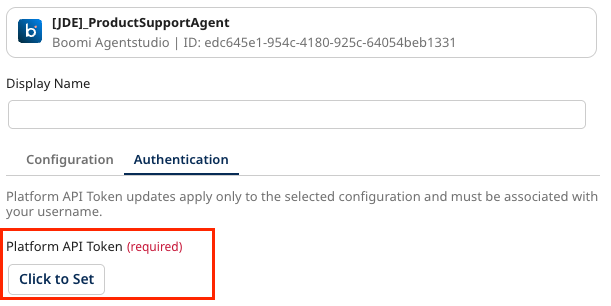
Click the Authentication tab.
-
In the Platform API Token field, paste your Platform API Token that you saved in the Prerequisites section.
-
Click OK.
Complete the Process
-
Click the + button on the canvas.
-
Search for and select End and Continue shape.
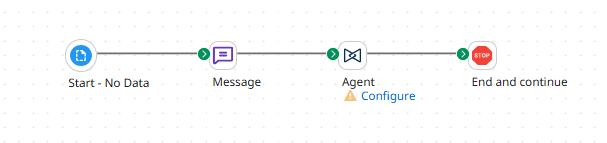
Your final process should look like this:
-
Click Save in the top right.
Test the Integration
Now let's test your integration to see the agent in action within the business process.
-
Click Test in the top right.

-
Select your Agent Testing environment (or the Testing Runtime you created in Prerequisites).
-
Click OK.
-
Watch the process execute.
What to Watch ForAs the test runs, observe:
- The integration prepares the customer message (Integration Layer)
- The Agent Step activates your Customer Support Agent (handoff to Reasoning Layer)
- The agent reasons about the customer's needs and selects appropriate tools
- The agent synthesizes information from multiple API calls
- The agent generates a comprehensive response
- The process completes with the agent's response (back to Integration Layer)
This is the two layers working in perfect harmony!
View the Agent's Response
-
When the test completes, click on the End and Continue shape.
-
Click View Source Data to see the complete response from the agent.
-
In the Document Viewer, scroll down to locate the agent's response in the raw payload.
Understanding the ResponseThe agent returns a detailed response that includes:
- All tool calls the agent made
- The reasoning steps the agent took
- The final comprehensive response to the customer
- Metadata about the execution
This raw format contains ALL of the events from the agent (action, thinking, tool calls, etc.), similar to the trace log you reviewed in Part 2!
Look at What the Agent Did!Review the resolution the agent created. Notice how it:
- Addressed the specific customer inquiry about the order status
- Pulled product compatibility information from the knowledge base
- Combined BOTH pieces of information into one comprehensive response
- Used a professional, human-like tone
- Provided a complete answer—not a generic template
This is role-based intelligence delivering business value!
What You've Accomplished
Let's reflect on the transformation you've created:
Traditional Task-Based Approach (What You Replaced)
- Rigid email parser looks for specific formats
- Hard-coded if/else logic routes to predefined templates
- Fails on natural language variations
- Can only handle ONE type of inquiry
- Requires constant maintenance as business rules change
- Creates more work when it encounters exceptions
Your Agentic Solution (What You Built)
- Flexible understanding: Parses natural language variations automatically
- Multi-intent handling: Addresses multiple customer concerns in one interaction
- Dynamic tool selection: Chooses which APIs to call based on context
- Synthesizing truth: Combines information from multiple systems intelligently
- Continuous learning: Can handle new scenarios without code changes
- Event-driven activation: Works autonomously when triggered by business events
The Business Impact
Your Customer Support Agent doesn't just execute tasks—it transforms the support workflow:
For Customers
- Faster responses: No waiting for human agents to research and draft replies
- Comprehensive answers: All questions addressed in one response
- 24/7 availability: Agent works continuously, even outside business hours
For Support Teams
- Focus on complex cases: Routine inquiries are handled automatically
- Consistent quality: Every response follows best practices and includes complete information
- Reduced burnout: Team isn't overwhelmed by high-volume, repetitive inquiries
For the Business
- Scalability: Handle 10x the support volume without hiring more staff
- Cost efficiency: Reduce average case handling time by 60-80%
- Better data: Every interaction is logged with full context for analytics
Architecting for Roles, Not Just Tasks
This lab demonstrated the fundamental shift in Role-based Agentic Architecture:
You started with the Integration Mindset:
- Building reliable "assembly lines" for data
- Predefined, rigid processes
- Task-focused automation
You evolved to the Agentic Mindset:
- Designing autonomous "digital colleagues"
- Flexible, goal-oriented reasoning
- Role-based intelligence
But you didn't abandon your integration skills—you elevated them! The Integration Layer still handles high-speed data flow reliably. The Reasoning Layer adds intelligence and autonomy on top. Together, they create systems that are both structured and adaptive.
The Art of the Possible
Now that you've built your first role-based agent, the possibilities are endless. Consider these extensions:
Expand the Agent's Role
- Add sentiment analysis to prioritize urgent/frustrated customers
- Connect to a billing API to handle payment inquiries
- Integrate with a warranty system to check coverage and process claims
- Add multi-language support for global customers
Connect to More Systems
- Trigger from Slack for internal support channels
- Connect to Zendesk, Salesforce Service Cloud, or ServiceNow
- Integrate with e-commerce platforms for order modifications
- Link to inventory systems for real-time availability
Add Intelligence
- Analyze resolution patterns to identify product issues
- Generate reports on common customer concerns
- Predict case escalation probability
- Recommend knowledge base improvements based on inquiry patterns
Build More Agents
- Billing Specialist Agent: Handle invoices, payments, and account questions
- Technical Support Agent: Diagnose complex product issues and arrange repairs
- Sales Assistant Agent: Help customers choose the right products
- Escalation Coordinator Agent: Monitor agents and route complex cases to humans
Each agent fills a role, not just a task. Together, they form a digital workforce that scales infinitely.
You've successfully built a Customer Support Agent using the principles of Role-based Agentic Architecture. Your agent doesn't just execute tasks—it fills a role, handles multiple intents, synthesizes information from multiple systems, and operates autonomously within defined guardrails.
You've transformed a manual, time-consuming support process into an intelligent, event-driven workflow that operates 24/7—reducing response times, improving consistency, and empowering your human team to focus on what they do best: solving complex, high-value problems.
Welcome to the agentic era. You're not just building automations—you're building colleagues.