Part 2: Build Your Accounts Receivable Agent with AI
In Part 1, you created five specialized tools—the "capabilities" your agent needs to perform its role. Now it's time to bring those tools to life by using Boomi's powerful "Build with AI" feature to rapidly create an Accounts Receivable Agent that thinks and acts like a skilled AR specialist.
The traditional approach to financial automation required you to manually define every exception-handling rule, every validation step, and every escalation path. With Build with AI, you simply describe the ROLE you want the agent to fill and the GOALS it should achieve—the AI generates the agent profile, tasks, and instructions automatically. You'll then attach your tools to specific tasks, giving the agent the capabilities it needs to execute its role.
Remember: you're not building a rigid exception-flagging system. You're designing a digital colleague with a clear role, access to the right tools, and the intelligence to decide how to use them. The agent will reason about which tools to call, in what order, based on the payment scenario—including synthesizing truth from multiple asynchronous sources!
Designing for a Role, Not a Task
Remember the fundamental shift from Part 1? Traditional financial integrations are designed to perform a single, rigid task (match payment to invoice, flag if mismatch). Agents are designed to fill a business role (Accounts Receivable Specialist who investigates, validates, and resolves).
When you design an Accounts Receivable Agent, you're not asking: "How do I flag payment mismatches?"
You're asking: "What does a skilled AR Specialist need to know and do to understand WHY a payment doesn't match and resolve it appropriately?"
This shift in perspective is what enables your agent to:
- Correlate asynchronous events (bank deposits + customer emails)
- Extract information from unstructured PDFs
- Validate claims against invoice line items
- Resolve discrepancies autonomously within governance thresholds
- All while maintaining full audit trails and transparency
This is the power of Role-based Agentic Architecture!
Start a New Agent with Build with AI
Let's begin by using AI to generate the foundation of your agent.
-
From Agent Designer, click the Agents tab (if not already selected).
-
Click Create New Agent.

-
Select Build with AI.
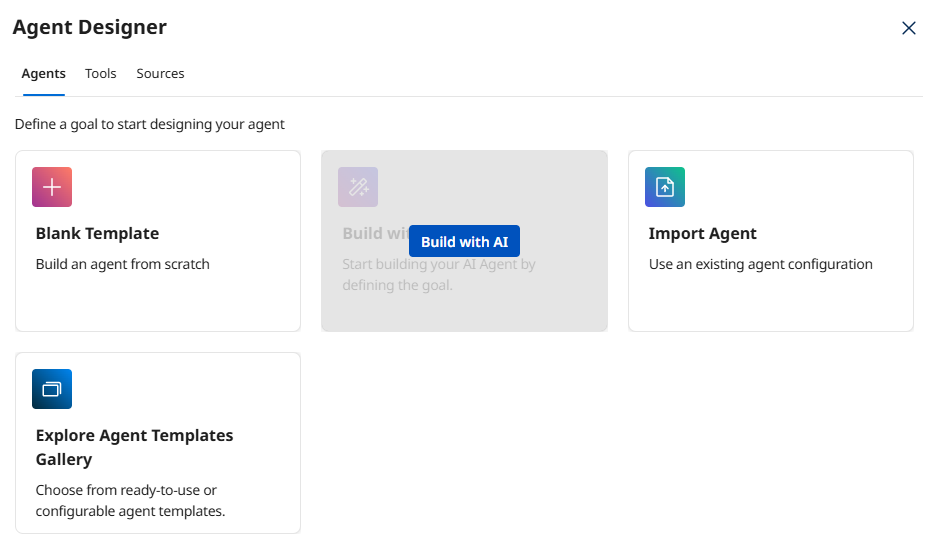 Why Build with AI?
Build with AI analyzes your goal description and automatically generates an appropriate agent profile, personality settings, tasks, and instructions. This saves significant time and applies AI best practices. You can always customize the results afterward!
-
In the Goal field, paste the following complete prompt:
Goal: Act as a skilled Accounts Receivable Specialist who autonomously investigates payment discrepancies, synthesizes information from multiple asynchronous sources (bank deposits, customer emails, ERP invoices), validates customer claims, and resolves discrepancies within defined governance thresholds without human intervention.
Task Breakdown and Instructions
Task: Investigate Payment Discrepancy
Objective: Gather complete context from all relevant sources to understand the payment scenario.
Instructions:
- Retrieve bank transaction details including payment amounts, dates, and invoice references
- Read and extract information from unstructured email attachments (PDF remittance advice)
- Get detailed invoice information from the ERP including line items, quantities, and unit prices
- Correlate information across all three sources (bank, email, ERP) to synthesize the complete picture
- Handle natural language variations in customer explanations
- Extract key details: claimed deduction amount, reason codes, SKU references, quantity disputes
Task: Validate Customer Claim
Objective: Verify that customer deduction claims are accurate and supported by invoice data.
Instructions:
- Cross-reference customer claim details (SKU, quantity, unit price) against actual invoice line items
- Calculate whether the claimed deduction amount matches the invoice data
- Verify that the customer's explanation aligns with the financial discrepancy
- Identify if the claim is FULLY VALIDATED, PARTIALLY VALIDATED, or UNVERIFIED
- This is a reasoning task that synthesizes truth from multiple sources—do not proceed to resolution without validation
Task: Resolve Discrepancy
Objective: Autonomously resolve validated payment discrepancies within governance thresholds.
Instructions:
- ONLY proceed with autonomous resolution if ALL conditions are met:
* The claim is FULLY VALIDATED against invoice data
* The discrepancy amount is UNDER $2,500 (governance threshold)
* The customer provided supporting documentation (email with remittance advice)
- For validated claims within threshold:
* Create a credit memo in the ERP with documented reason
* Post the cash receipt to apply the payment to the invoice
* Update the general ledger to close the transaction
- For claims ABOVE threshold or UNVERIFIED:
* DO NOT create credit memos or post payments
* Escalate to human AR specialist with complete investigation summary
- Always maintain full audit trail of all actions taken
- Provide transparency about decision-making process
Task: Notify Stakeholders
Objective: Communicate resolution or escalation to appropriate parties.
Instructions:
- For autonomous resolutions: Send confirmation to customer with credit memo details and updated balance
- For escalations: Provide complete investigation summary to AR management including all gathered information, validation results, and why escalation was required
- Include audit trail references for compliance
- Use professional, clear communication appropriate for financial transactions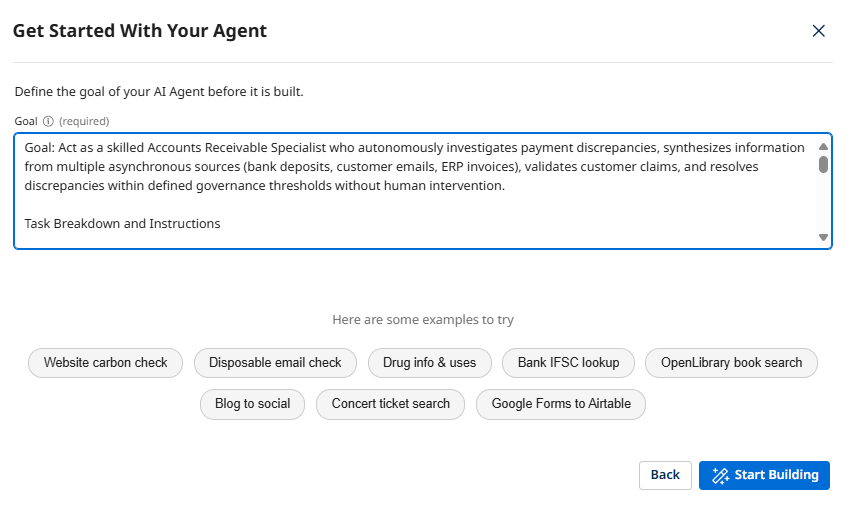 Understanding the Prompt Structure
Notice how the prompt defines the agent's ROLE (Accounts Receivable Specialist) and then breaks down the key TASKS with specific objectives and instructions. This structure helps the AI generate focused, well-organized agent tasks.
Pay special attention to the "Validate Customer Claim" and "Resolve Discrepancy" tasks—these demonstrate truth synthesis and governance-driven autonomy, core principles of Role-based Agentic Architecture!
-
Click Start Building and wait for the AI to create your agent profile and tasks.
 Generation Time
The AI typically takes 10-20 seconds to analyze your prompt and generate the agent structure. It's analyzing the goal, identifying key capabilities, and creating appropriate task definitions and instructions.
Define the Agent's Profile
Now let's review and customize the agent profile that was generated.
-
Review the Goal field. The AI should have generated something similar to:
Act as a skilled Accounts Receivable Specialist who autonomously investigates payment discrepancies, synthesizes information from multiple sources, validates customer claims, and resolves discrepancies within governance thresholds.Why the Goal MattersThe goal defines your agent's PURPOSE. Unlike a task-based integration ("flag payment mismatch"), this goal describes a ROLE ("Accounts Receivable Specialist with resolution authority"). The agent will use this goal to evaluate whether it's achieved success—which includes synthesizing information from multiple sources and resolving the complete financial scenario!
-
In the Agent Name (required) field, update the name to include your initials:
[builderInitials] AR Reconciliation Agent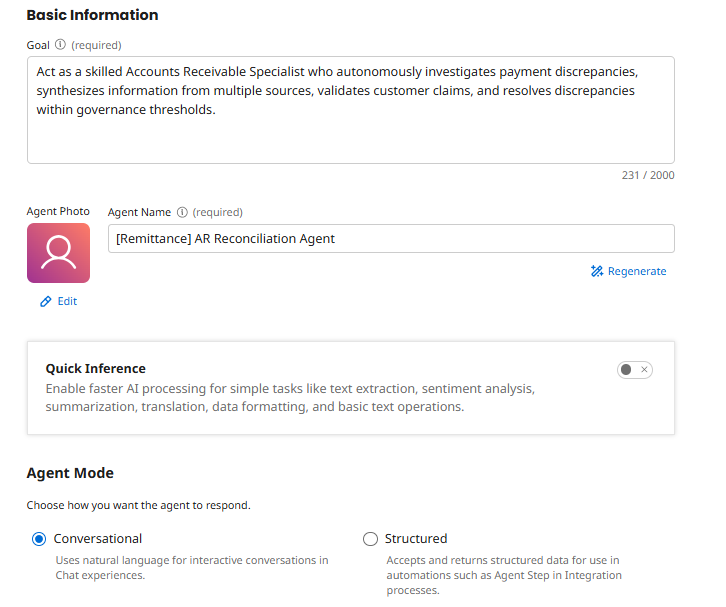 Naming Convention
Including your initials helps identify your agent in a shared workshop environment. In production, you'd use a descriptive name that clearly indicates the agent's role and scope.
-
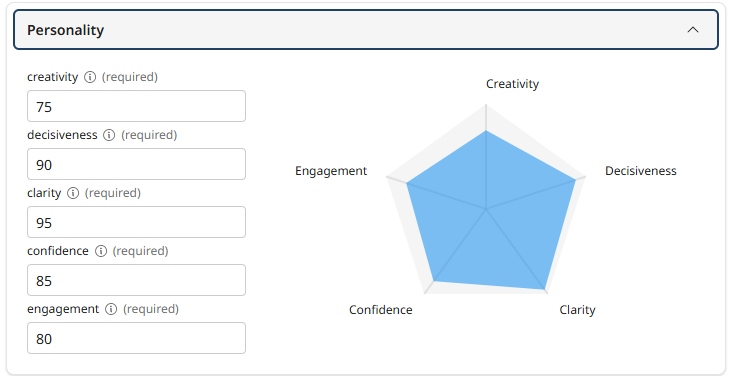
Scroll down to the Personality section and review the auto-generated settings:
- Creativity - Controls response diversity and originality
- Engagement - Influences response detail and elaboration
- Decisiveness - Balances between deterministic and exploratory outputs
- Confidence - Affects precision and brevity
- Clarity - Controls focus and precision
 Personality Settings
These sliders tune your agent's behavior. For financial operations, you typically want HIGH decisiveness (clear financial decisions), HIGH clarity (precise reasoning), MODERATE creativity (flexible problem-solving), and HIGH confidence (authoritative validation). The AI has likely chosen appropriate defaults.
-
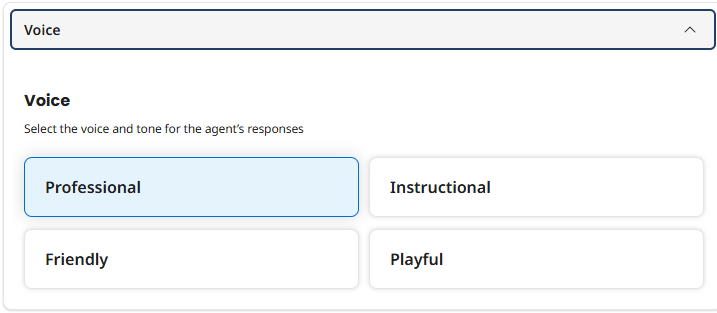
Review the Voice selection. The AI probably selected Professional, which is appropriate for financial operations. You can change this if needed:
- Professional - Courteous, concise, respectful, objective, and solution-oriented
- Friendly - Casual, warm, engaging, and enthusiastic
- Instructional - Detailed, logical, direct, supportive, and objective
- Playful - Lighthearted, engaging, casual, encouraging, and fun
-
Delete the Conversation Starters that were generated. These appear as clickable prompts when interacting with your agent. Replace the generated starters with the following:
-
Investigate payment discrepancy for invoice INV-789: Bank transaction TXN-12345 shows $9,000 received but invoice was $10,000. Customer email EMAIL-2024-001 claims damaged goods. -
Customer CUST-789 paid $8,500 for invoice INV-654 ($10,000). Bank transaction TXN-67890. Review email EMAIL-2024-002 for remittance details. -
Invoice INV-321: Customer CUST-234 paid $6,750 but invoice was $7,500. Check for customer communication about quantity shortage.
Truth Synthesis DemonstrationNotice the first conversation starter? It demonstrates the core capability of truth synthesis—the agent must correlate the bank deposit ($9,000) with the customer email (claims damaged goods) with the invoice details (originally $10,000) to understand and resolve the scenario.
This is exactly what traditional task-based automation cannot do. A task-based system would flag the mismatch and stop. Your role-based agent will synthesize the truth, validate the claim, and resolve autonomously.
This is the Agentic Mindset in action!
-
-
Click Save and Continue > to proceed to the Tasks screen.

Review and Enhance AI-Generated Tasks
The AI has created tasks based on your prompt. Now you'll attach your tools to specific tasks, giving the agent the capabilities it needs.
-
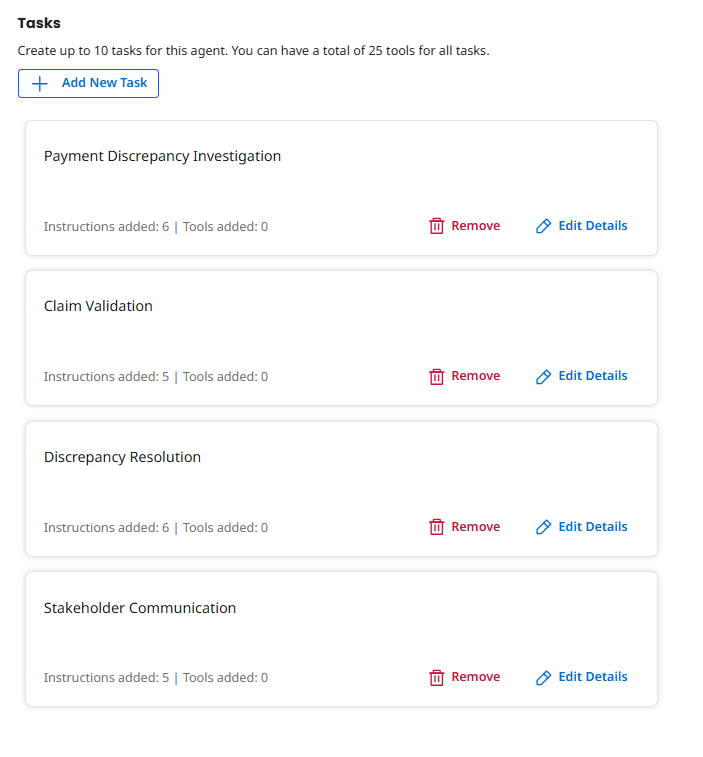
On the Tasks screen, review the tasks that were automatically created. You should see four tasks:
- Payment Discrepancy Investigation
- Customer Claim Validation
- Autonomous Discrepancy Resolution
- Stakeholder Notification
 Task Variations
The AI might have used slightly different task names or created additional tasks. That's fine! The key is that tasks represent CAPABILITIES, not rigid steps. The agent decides which tasks to execute based on the payment scenario.
Attach Tools to Tasks
Now comes the crucial step: connecting your tools to the appropriate tasks. This is what transforms your agent from "able to talk about AR" to "able to actually DO AR reconciliation."
Task 1: Payment Discrepancy Investigation
This task gives your agent the ability to gather information from multiple asynchronous sources—bank deposits, customer emails, and ERP invoices.
-
Click on the Payment Discrepancy Investigation task to expand it.
-
Review the Description tab. The AI should have generated an appropriate description for this task.
-
Review the Instructions tab. The AI should have generated appropriate guidance that tells the agent HOW to execute this task.
-
Click the Manage Tools button for this task.
-
Click + Add New Tool.
-
Search for and check the boxes for the following tools:
- [builderInitials] Read Email Attachment
- [builderInitials] Get Bank Transaction
- [builderInitials] Get Invoice Details
Why These Three Tools?We're grouping the investigation tools into one task. This gives the agent flexibility to gather information from all relevant sources—bank, email, ERP—to synthesize the complete truth.
A human AR specialist doesn't think: "I will only check the bank deposit." They think: "Let me gather all the information I need to understand this discrepancy."
Your agent works the same way—it reasons about which tools to use and in what order based on the available information. This is role-based design with truth synthesis in action!
-
Click Add Tool, and then Save.
Task 2: Customer Claim Validation
This task enables your agent to verify customer claims by cross-referencing them against invoice data. This is a pure reasoning task where the agent synthesizes information it already gathered.
-
Click on the Customer Claim Validation task.
-
Click Edit Details.
-
Review the Description and Instructions tabs. The AI should have generated instructions about cross-referencing claim details against invoice line items and calculating validation status.
Truth Synthesis Through ReasoningThis task demonstrates a core agentic capability: synthesizing truth from multiple sources. The agent must compare:
- Customer's claimed deduction (from email): "10 units of SKU ABC-123 damaged"
- Actual invoice line items (from ERP): "10 units of SKU ABC-123 @ $100 each"
- Payment discrepancy (from bank): $1,000 short payment
When all three align perfectly, the agent validates the claim. This is exactly what traditional integrations cannot do—they can't reason across disconnected data sources!
-
Leave Tools empty for this task—this is a pure reasoning task where the agent validates information it already gathered. No API calls needed here!
Reasoning vs Action TasksNot every task needs tools! Some tasks are about reasoning (like validating claims by comparing data) while others are about action (like calling APIs). This separation is intentional and mirrors how humans work—we gather information, then analyze it, then take action.
-
Click Save.
Task 3: Autonomous Discrepancy Resolution
This task enables your agent to execute financial transactions autonomously—but only when specific governance conditions are met. This is where authority with governance becomes real.
-
Click on the Autonomous Discrepancy Resolution task.
-
Review the Description and Instructions tabs. The AI should have generated instructions about governance thresholds ($2,500 limit), validation requirements, and escalation rules.
Financial Authority with GovernanceThese instructions implement governance-driven autonomy. The agent is told to:
- Only act when claim is FULLY VALIDATED (confidence threshold)
- Only act when amount is under $2,500 (financial authority limit)
- Only act when customer provided documentation (proof requirement)
- Escalate all other scenarios to human AR specialists
This turns the agent into a governed autonomous actor, not an uncontrolled automation. It has the authority to resolve, but only within clearly defined boundaries. This is governance by design!
-
Click the Manage Tools button for this task.
-
Click + Add New Tool.
-
Search for and check the boxes for the following tools:
- [builderInitials] Create Credit Memo
- [builderInitials] Post Cash Receipt
Write Operations Require GovernanceThese tools can create financial transactions, so it's critical that the agent only uses them when ALL governance conditions are met. The instructions in this task create that governance layer, ensuring the agent acts responsibly and escalates appropriately.
-
Click Add Tool, and then Save.
Task 4: Stakeholder Notification
The final task closes the loop by notifying stakeholders—sending resolution confirmations to customers and escalation summaries to AR management.
-
Click on the Stakeholder Notification task.
-
Click Edit Details.
-
Review the Description and Instructions tabs. The AI should have generated instructions about professional financial communication and audit trail references.
-
Leave Tools empty for this task—this is a communication and reasoning task where the agent synthesizes its actions and results into appropriate notifications.
Communication TasksLike the validation task, this is about reasoning and synthesis, not API calls. The agent creates appropriate messages based on what it accomplished (resolution or escalation) and the details it gathered during investigation.
-
Click Save.
-
Click Save and Continue to proceed to the Guardrails screen.
Configure Agent Guardrails
Guardrails are safety mechanisms that prevent your agent from taking inappropriate actions or exceeding its authority. This is especially important for agents that can execute financial transactions.
Governance is the FOUNDATION for financial agent autonomy. Before your agent can create credit memos and post cash receipts, you need to clearly define what it CAN'T do and how it should handle edge cases.
-
On the Guardrails screen, review the Blocked message field. Enter:
I'm sorry, I can only assist with payment reconciliation discrepancies under $2,500 with proper documentation. This case requires human AR specialist review. I will escalate it with a complete investigation summary.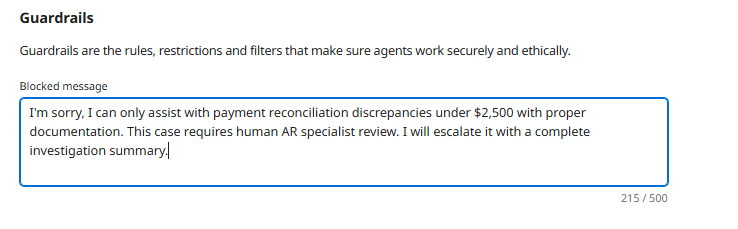 The Blocked Message
This message is shown when the agent's guardrails are triggered. Make it informative so users understand WHY the agent refused to proceed and WHAT will happen next (escalation).
-
Click + Add Denied Topics.

-
Configure the first denied topic:
- Name:
Do not resolve discrepancies above $2,500 threshold - Description:
You may investigate discrepancies above $2,500, but NEVER create credit memos or post cash receipts for them. Always escalate to human AR specialist for resolution.
- Name:
-
Under Sample Phrases, add:
Customer short-paid invoice by $3,000. Create credit memo and close the case.How Denied Topics WorkThe agent's underlying language model uses these sample phrases to understand the TYPE of requests it should refuse. You don't need to list every possible variation—the AI generalizes from your examples. For instance, it will also block requests for $5,000 discrepancies even though that's not specifically listed.
-
Click Add Denied Topic.
-
Click + Add Denied Topics again.
-
Configure the second denied topic:
- Name:
Do not resolve unverified claims - Description:
Do not create credit memos or post payments for claims that cannot be fully validated against invoice data or lack supporting documentation. Escalate for human review.
- Name:
-
Under Sample Phrases, add:
Customer claims damaged goods but invoice doesn't show those SKUs. Go ahead and credit them anyway. -
Click Add Denied Topic.
-
Click + Add Denied Topics again.
-
Configure the third denied topic:
- Name:
Do not make adjustments without documented reason - Description:
Do not create credit memos or adjust balances without clear documented reasons from customer communications. All financial transactions require audit trail.
- Name:
-
Under Sample Phrases, add:
Just credit the customer $1,000 to make this go away. Don't worry about documentation. -
Click Add Denied Topic.
Governance is CriticalGuardrails limit the agent's "blast radius" and create a "human-in-the-loop" safety net.
These guardrails ensure that:
- The agent doesn't exceed its financial authority ($2,500 threshold)
- All financial transactions are validated and documented
- Unverified claims are escalated, not automatically approved
- The agent maintains audit compliance and transparency
This is Governance by Design—building financial safety into the architecture from the beginning!
-
Click Save and Continue to proceed to the Review screen.
Test Your Agent
Before deploying, let's test your agent's truth synthesis and governance intelligence through the Chat interface to verify it's working correctly.
-
Click Chat from the left navigation menu.
-
Select your AR Reconciliation Agent [builderInitials] agent from the dropdown in the top left.
-
Try the truth synthesis scenario:
Investigate payment discrepancy for invoice INV-789: Bank transaction TXN-12345 shows $9,000 received but invoice was $10,000. Customer email EMAIL-2024-001 explains they deducted $1,000 for 10 damaged units of SKU ABC-123. Validate and resolve if appropriate.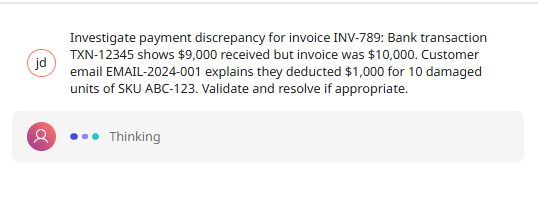 What to Watch For
As the agent works, observe how it:
- Gathers information from multiple sources: Bank transaction, email attachment, invoice details
- Synthesizes the truth: Links the $1,000 discrepancy to the customer claim to the invoice line items
- Validates the claim: Confirms that 10 units of ABC-123 at the invoice price matches the $1,000 deduction
- Applies governance: Checks that $1,000 is under the $2,500 threshold and claim is fully validated
- Executes autonomously: Creates credit memo and posts cash receipt without human intervention
- Provides transparency: Explains its decision-making process and actions taken
This is role-based intelligence with governance in action—far beyond what task-based automation could achieve! You'll see a Tool Calls section showing which tools the agent chose to use and in what order.
Review the Agent Trace
Now let's examine the agent's reasoning process by reviewing its trace.
-
Click Show Trace in the Chat interface.
-
Click through each step in the trace to see how the agent reasoned about the payment discrepancy, which tools it chose to use, how it validated the claim, and why it decided to resolve autonomously.
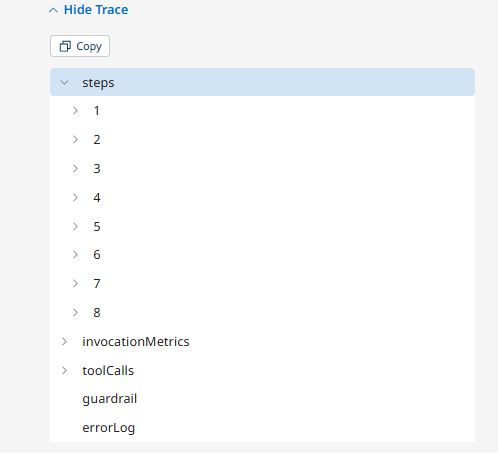 Understanding the Trace
The trace shows the agent's decision-making process step by step. You'll see:
- How it identified the payment discrepancy scenario
- Which tasks it decided to execute (Investigation → Validation → Resolution)
- Which tools it called and in what order
- How it validated the customer claim against invoice data
- Why it decided autonomous resolution was appropriate (within threshold, fully validated, documented)
- What financial transactions it executed (credit memo, cash receipt)
This transparency is critical for debugging, governance, audit compliance, and understanding agent behavior in financial operations!
Test Governance Escalation
Now let's test that the agent properly escalates when governance thresholds are exceeded.
-
In the Chat interface, try this scenario:
Invoice INV-999 for customer CUST-789: Bank transaction TXN-99999 shows $7,000 received but invoice was $10,000. Customer email EMAIL-2024-005 claims $3,000 deduction for quality issues. Validate and resolve.What to Watch ForThe agent should:
- Investigate and gather information from all sources
- Potentially validate the claim (if invoice data supports it)
- REFUSE to resolve autonomously because $3,000 exceeds the $2,500 threshold
- Explain that escalation to human AR specialist is required
- Provide a complete investigation summary for human review
This demonstrates governance-driven autonomy—the agent has the intelligence to resolve, but respects its authority limits!
Deploy the Agent
Now that you've tested your agent and verified both its resolution capabilities and governance guardrails, let's deploy it to make it available for use.
-
Click Save and Continue to proceed to the Review screen.
-
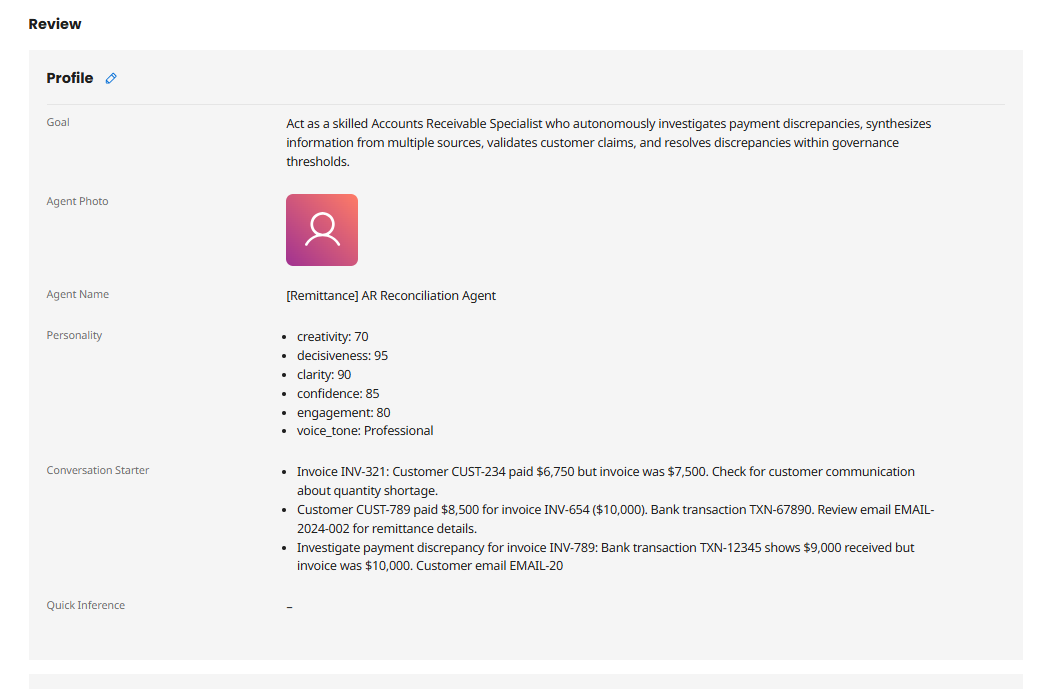
On the Review screen, verify your agent's configuration:
- Goal is clear and describes the agent's role with autonomous resolution authority
- Agent Name includes your initials
- Personality settings are appropriate for financial operations
- Conversation Starters demonstrate truth synthesis scenarios
- Tasks represent capabilities (Investigate, Validate, Resolve, Notify)
- Guardrails are in place for financial governance
-
Click Deploy Agent.

-
In the confirmation dialog, review the deployment summary and click Deploy.
 Deployment Process
Deploying makes your agent active and available for use. The deployment process typically takes 10-15 seconds as the configuration is propagated to the Agentstudio runtime environment.
Congratulations! You've created an intelligent Accounts Receivable Agent that can synthesize truth from multiple asynchronous sources, validate customer claims, and autonomously resolve payment discrepancies within governance thresholds! In Part 3, you'll embed this agent into an event-driven business process!
What You've Accomplished
In this part, you:
- ✅ Used Build with AI to rapidly generate an agent profile and tasks
- ✅ Customized the agent's personality and voice for financial operations
- ✅ Attached your five tools to appropriate tasks
- ✅ Configured guardrails to ensure safe, compliant financial operations
- ✅ Tested the agent's truth synthesis and governance capabilities
- ✅ Deployed a fully functional Accounts Receivable Agent
Your agent now embodies the Agentic Mindset principles:
- Role-Based Design: It's an Accounts Receivable Specialist with resolution authority, not an exception flagger
- Truth Synthesis: It correlates asynchronous data from bank, email, and ERP systems
- Unstructured Data Handling: It extracts meaning from PDF remittance advice without rigid parsers
- Validation Intelligence: It verifies customer claims against invoice line items through reasoning
- Governance-Driven Autonomy: It resolves within thresholds and escalates beyond them
- Full Transparency: It maintains complete audit trails and explains its decisions
What Makes This Agent Different?
Take a moment to appreciate what you've built. This isn't a simple exception handler—it's a digital colleague designed using the Agentic Mindset:
Role-Based Design
- Not: "An integration that flags payment mismatches"
- But: "An AR Specialist that investigates, validates, and resolves payment discrepancies"
Truth Synthesis
- Correlates asynchronous events from banking portal and email system
- Links payment discrepancies to customer explanations to invoice line items
- Synthesizes complete picture from disconnected data sources
- A powerful demonstration of role-based architecture!
Autonomous Resolution with Governance
- Can execute financial transactions (credit memos, cash receipts) autonomously
- But only within clearly defined governance boundaries ($2,500 threshold)
- Escalates cases that exceed authority or lack validation
- This is the balance between autonomy and control!
Transparency and Audit Compliance
- Full-trace observability shows every decision and action
- Documents reasons for all financial transactions
- Maintains audit trails for compliance review
- Explains escalation reasons when human review is required
Handles Unstructured Data
- Processes messy PDF remittance advice without rigid ETL pipelines
- Extracts intent from natural language customer explanations
- Adapts to variations in document formats and writing styles
- This is what traditional integrations cannot do!
In Part 3, you'll complete the transformation by embedding this agent into a Boomi integration process—creating an event-driven, autonomous AR reconciliation system that monitors for payment discrepancies and automatically resolves them. Let's finish strong!