Part 3: Test the Agent
Now that you've built your agent and defined its tasks, it's time to test the complete workflow. You'll submit a sample EDI document and verify that your agent successfully extracts the data, generates the XML specification, and creates a trading partner in the Boomi Platform.
Find Your Agent
-
From the Agent Garden > Agents page, find your agent.

-
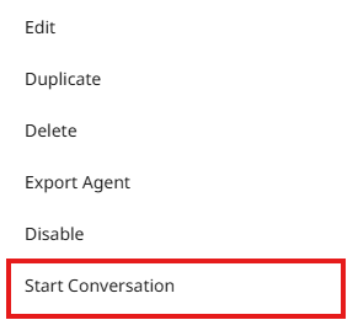
Click the three dots on the right side of your new agent, and click Start Conversation.
Submit the EDI Document
-
Copy and paste the following prompt, which includes a sample EDI document:
Convert this EDI document into a Trading Partner:

ISA*00*          *00*          *ZZ*8019473100SOFS *12*4152562417     *250723*0915*U*00401*205781088*0*P*>
GS*PO*8019473100SOFS*4152562417*20250723*0915*205790705*X*004010
ST*850*211881063
BEG*00*DS*110885110-1*458589334*20250723
REF*WH*SAVANNAH
REF*RN*OSTK
TD5**94*GROUND
N1*ST*Peter Smith
N3*3123 main street*Apt 4B
N4*NY*NY*14850*US
PER*OC*Peter Smith*TE*2125551212*FX*2125551300*EM*psmith@connectalllogistics.com
N1*RT*Supplier
N3*8150 Industrial Boulevard*Ste A
N4*Breinigsville*PA*18031*US
PER*OC*Supplier*TE*800-111-2446
PO1*1*1*EA*1.00*SK*123456*BP*325845787
PID*F****Purple
SAC*C*C850***0.00
CTT*1
SE*18*211881063
GE*1*205790705
IEA*1*205781088 -
Click the Send button or press the Enter key.
Verify the Trading Partner Was Created
-
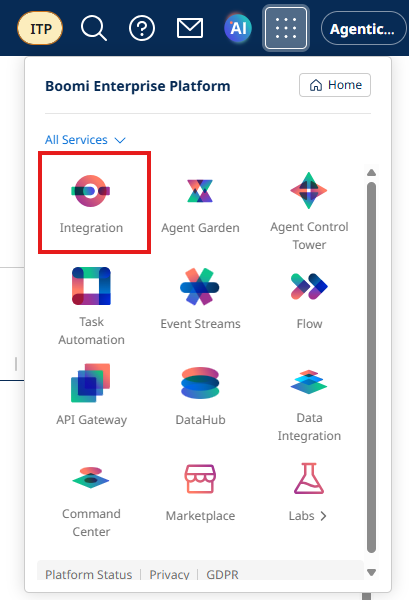
Once the agent has finished processing, navigate to Integration by clicking the waffle menu at the top of the screen and clicking Integration.
-
Locate the
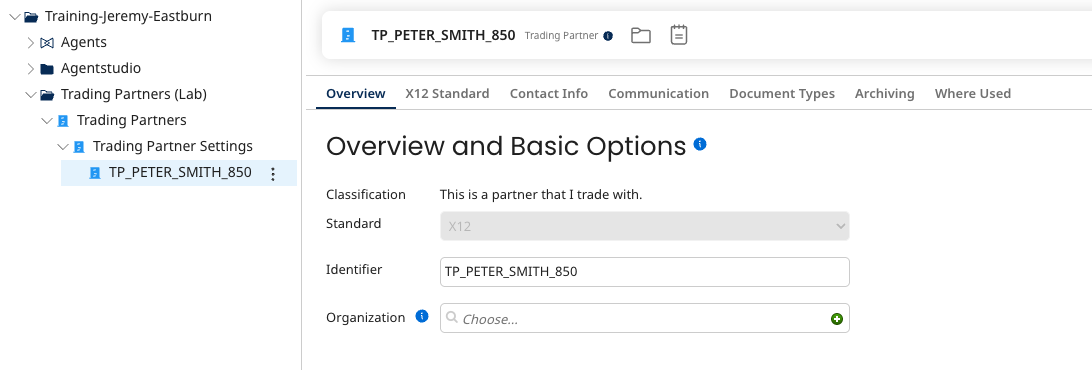
Trading Partners (Lab)folder that was auto-created in the finder sidebar. -
Verify that your new Trading Partner has been created.
You've successfully built an EDI Trading Partner Onboarding Agent that automates document parsing and integration workflows. Your agent can now process EDI documents and create trading partners automatically!