Prerequisites
Get Your Platform API Key
Navigate to Settings
-
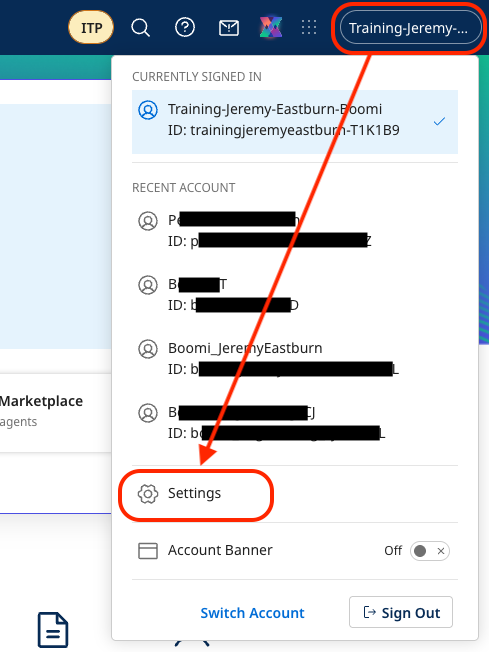
From within the platform, select (Account Name) → Settings from the top-right menu.
-
Click on Platform API Tokens in the left navigation pane.
-
Click + Add New Token.
-
Name your token
EDI Agent Token. -
Click Generate Token.
-
Click Copy to Clipboard & Close.
ReminderRemember to save your
Boomi Platform API Tokento a notepad for later use.
Retrieve Your Boomi Account ID
-
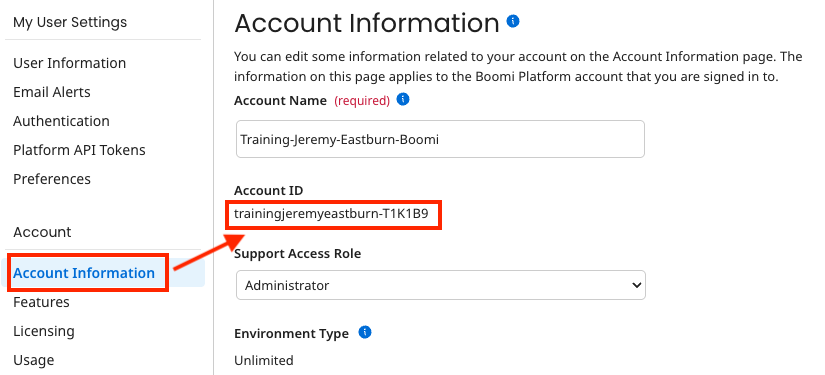
Select Account Information in the menu on the left
-
Copy the Account ID and save it in your text editor.
 Reminder
Remember to save your
Account IDto a notepad for later use.