Prerequisites
This lab spans the Boomi platform. Confirm the access and setup below before you begin.
-
Login to the shared Workshop Environment. Check your email for a platform invite if you have not logged in already.
Note for SSO UsersIf you normally sign in to an existing Boomi account with SSO, sign out and sign in with username/password at https://platform.boomi.com.
Trial Instance CompatibilityBecause of the way this lab is setup, it can be run effectively in a fully provisioned trial instance as well. In certain places, the lab will have users in the shared account skip a step because it is already done for them. In trial environments, you will have to run these steps.
-
Load this guide into a separate tab so you can follow along as we build across each pillar.
You are working in a shared workshop account. The DataHub repository, the CustomerGolden360 model, its match rules, and the seeded Acme golden records are already built and shared by everyone in the room. Treat DataHub as read-only here. Do not:
- regenerate or revoke the repository's Hub Authentication Token,
- edit, re-publish, or re-deploy the model or its match / survivorship rules,
- run initial-load operations (enable/finish initial load) on any source,
- merge, delete, or steward golden records, or delete the repository or sources.
Any one of these changes DataHub for the whole room. In Parts 2, 3, and 6 you will follow along and observe the canonical result rather than mutate it. If you want to build DataHub end-to-end with your own hands, do it in your own free Boomi trial — see Appendix: Build the DataHub Model in Your Own Trial — where you cannot affect anyone else.
Set Up Companion
To setup Boomi Companion for this lab, follow these steps:
- Install the Boomi Companion plugins into Claude Code from the official repository: https://github.com/OfficialBoomi/boomi-companion. If you are using another tool, you can also download the skills directly and install them that way.
- Download the agent skill used in Parts 5, 6, and 7: agent-management-skill.zip.
- Confirm Companion is accessible as a skill in a Claude Code (or Codex) session and is pointed at the shared workshop account. You will have to provision a Platform API Key, and provide some basic information for Companion to be able to reach the account. You will find that information below.
Generate a Platform API Token
You'll need a Boomi Platform API Token and Account ID to configure the Agent step in Part 3 when embedding your agent into an integration process.
-
Log in to your Boomi account at https://platform.boomi.com.
-
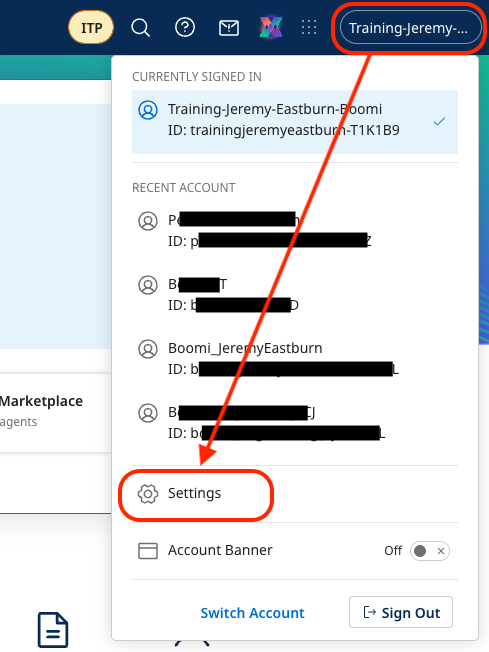
Select (Account Name) → Settings from the top-right menu.
-
Select Platform API Tokens. Create a new token named
Agentstudioand save it in a text editor (Notepad, TextEdit or VS Code).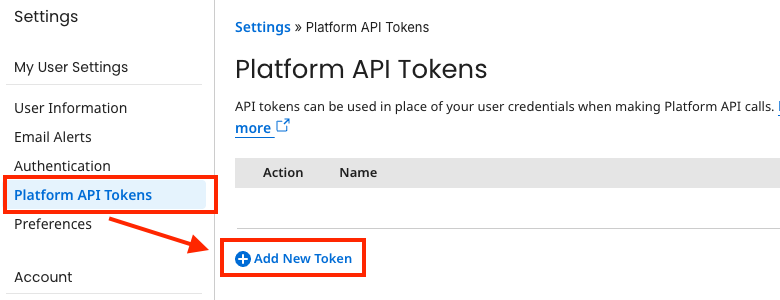 Save Your Token
Remember to save your Platform API Token to a text editor for later use in Part 3.
-
Select Account Information to copy the Account ID and save it in your text editor.
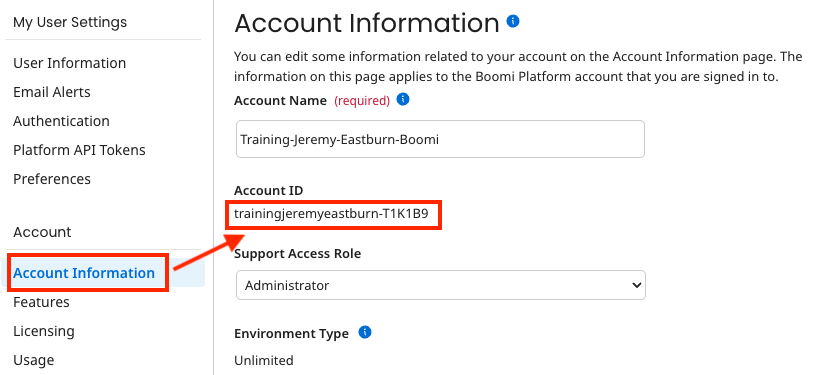 Save Your Account ID
Remember to save your Account ID to a text editor for later use in Part 3.
Provide Companion with Access
We will need to provide Companion with credentials to access the platform. For this lab, you will need:
-
Boomi API URL:
https://api.boomi.com -
Your Boomi Username (typically your email)
-
The API Key you just provisioned
-
The Boomi Account ID. For the Shared Workshop Account, that is
boomi_joel_davenport-XBUHTV. If you are doing this in a trial instance, you can use the Account ID you found above. -
The target folder ID. We will actually have companion look for your folder, so no need to worry about this right now.
When you install the Companion plugin, and add the agent-management skill, you can then ask for the assistant to run env setup. It will create a .env file for you that we will utilize throughout this lab. Paste the values we just gathered into that file. You don't need to worry about the rest of the variables in that .env file yet. We will come back to it in later parts of this lab.
Platform Access
You will work across the four Boomi pillars in this lab. Confirm you can reach the other four from the platform navigation:
- Integration — to onboard the BetaCorp structured sources (Part 3). (In production, the same pillar can orchestrate the agent; in this lab you invoke the agent conversationally.)
- DataHub — to explore the golden Customer model (Part 2) and watch it match and survive candidates (Part 6).
- API Management — to publish the agent's action APIs as governed managed APIs and register the MCP source (Part 4).
- Agentstudio — to review the Unstructured Onboarding Analyst agent (Part 5) and the read-only Customer 360 Analyst agent (Part 7) that Companion builds.
Sample Records — download these first
This lab ships with a curated set of sample records. Rather than copy data into prompts, you will point Companion and the agent at these files. Download the whole bundle now, or grab individual files as each part calls for them.
📦 Download all sample records (.zip)
Acme master records (structured)
acme-golden-records.json— Acme's existing golden customers (Salesforce/Marketo) that DataHub matches against.acme-golden-records-batch.xml— the same six golden records in the DataHub batch upsert shape, ready to load into theACME_SFDCsource (used only in the appendix own-trial build).
BetaCorp structured exports (onboarded in Part 3)
betacorp-customers-dynamics.csv— Dynamics 365 account records.betacorp-billing-sap.csv— SAP billing records (tax id, terms).
BetaCorp unstructured artifacts (read by the agent in Parts 6 and 7 — each has an artifact id)
MSA_NW-2023-0412_Northwind.pdf— Northwind contract —MSA_NW-2023-0412MSA_HOOLI-2024-0033_PiedPiper.pdf— Hooli contract —MSA_HOOLI-2024-0033CRM_GBX-118_Globex.txt— Globex CRM note —CRM_GBX-118CRM_STK-902_Starke.txt— "Starke Ind." CRM note —CRM_STK-902TICKET_INIT-4471_Initech.txt— Initech support ticket —TICKET_INIT-4471TICKET_WONKA-2210_Wonka.txt— Wonka support ticket —TICKET_WONKA-2210
Build gotchas
GOTCHAS.md— known non-obvious build errors for this lab (Combine Documents, flat-file text qualifier, CLI env vars) with root cause and fix. Also included in the bundle above — keep it in the folder you point Companion at.
The six BetaCorp artifacts are chosen deliberately. Three produce clean matches (Northwind, Globex, Initech), one is a clean net-new insert (Wonka), one hides a subsidiary inside a contract clause (Pied Piper under Hooli), and one is an ambiguous identity that must defer to a human steward ("Starke Ind."). Keep this in mind as you work — every outcome you see later was designed in here.
Action API and MCP Source Setup
The agent's read and write tools are backed by a deployed API, exposed to the agent through a Boomi MCP source. This backing platform — the API, its governance, and the MCP source — is already built, registered, and deployed for the workshop; your instructor will confirm it is live before Part 4. Part 4 walks how it was governed and registered, and you bind your agent's tasks to the pre-registered source in Part 5.
For reference, the mock API is gated by an two API keys passed in the x-api-key and x-agent-key headers, and the MCP source is registered with HTTP transport (not SSE) pointing at the Control Plane MCP bridge for the API.
The mock API's x-api-key and x-agent-key values and the MCP bridge auth header are account-specific secrets. They are provisioned for you and referenced by placeholder throughout this guide. Do not paste real key values into any component, prompt, or document you create.
Lab Build Steps
This workshop guides you through consolidating Acme and BetaCorp into a single trusted Customer 360 across the full Boomi platform — with every build step driven through Companion. You will draft the architecture with Companion, explore the deterministic DataHub model, onboard structured sources with Integration, govern the agent's action tools through API Management, build a governed AI agent that reads unstructured material DataHub cannot, run the consolidation end-to-end — and finish by giving the result a conversational analyst (Part 7).